Schedule tweets with TrueSocialMetrics
by Member of TrueSocialMetrics team ~ 2 min
Tweets Scheduling is now available on True. Woohoo! We are thrilled to announce that now you can post and schedule tweets directly from your TrueSocialMetrics account. No need to switch between tools now - Post tweets and analyze them in one place.
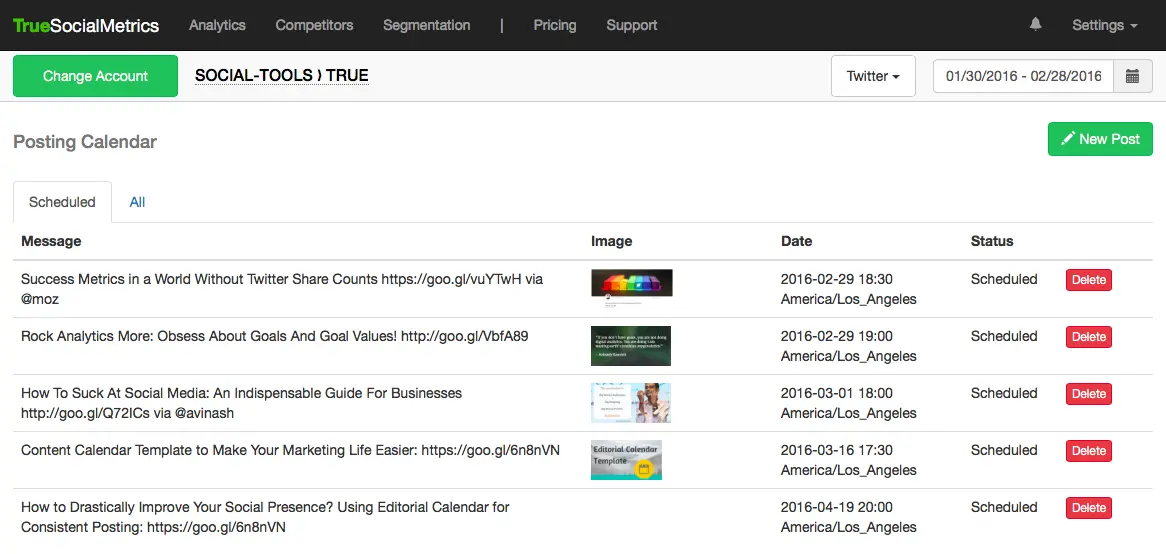
Tweets Scheduler is available on all paid plans.
Note: You’ll need to have admin permissions to post on a Twitter account (your personal account or company account). And, for obvious reasons, you can’t post to your competitors’ accounts. :)
Note: We will post ONLY the posts you have scheduled within your TrueSocialMetrics account. We will NOT post anything else without your consent.
You can post tweets with images, links, mentions and hashtags.
Here’s how to schedule tweets in your TrueSocialMetrics account:
- First, log in to Twitter with the account you’d like to post from (personal or business page). Then head to TrueSocialMetrics.

- If you’ve got an account with us already, head to your Metrics report. (If you don’t have an account with us, sign up first.) On the top left side make sure you have selected the correct account (account you have permissions to post to) and click on the ‘Manage Sources’ link below the table.
- Find ‘Twitter’ in the list and click the ‘Schedule posts’ button.
- Provide permissions for TrueSocialMetrics app to post in your Twitter account (remember Step 1 where you had to log in to your Twitter account. If you haven’t done this yet, do it now to authorize TrueSocialMetrics).
Tip: For convenient scheduling, don’t forget to set your timezone in Settings --> Profile page.
Tip: Check out our Best Time to Post report to improve your posting schedule and get more engagement for your tweets.
Tip: Google Url Shortener is integrated in our Scheduler, so every link in your tweets is automatically shortened.
Now you are ready to rock and roll. Easy peasy! :)
I’d love to hear what you think about Posting and if you have any questions or improvement ideas, drop me a line.
P.S.: Some cool improvements to Scheduler are already on their way.
When you’re ready to rock your social media analytics
give TrueSocialMetrics a try!
Start Trial
No credit card required.
Continue reading
AB Testing with Google Analytics and Event Tracking

Google+ Communities: Analyzing Community Health

30-Days Worth of Advice to Improve Your Social Media Presence

How Often Top Brands Tweet
